Setup an application on Google Cloud Platform (GCP)
This is a step by step guide of setup a project on Google Cloud Platform. Lets start with a Laravel project. I'm assuming you have following prerequisites.
- You already have an account on GCP.
- You have filled your billing details.
- You have a project repository.
Lets start with GCP.
1. Create an APP
- Go to GCP console. https://console.cloud.google.com.
- If you are not login then do it.
- If it's you first time on console, then it shows a pop-up for T&C. Fill you details and click continue.
- Click on Select Project, It would open a pop up and pop-up has a new project button. Click it.
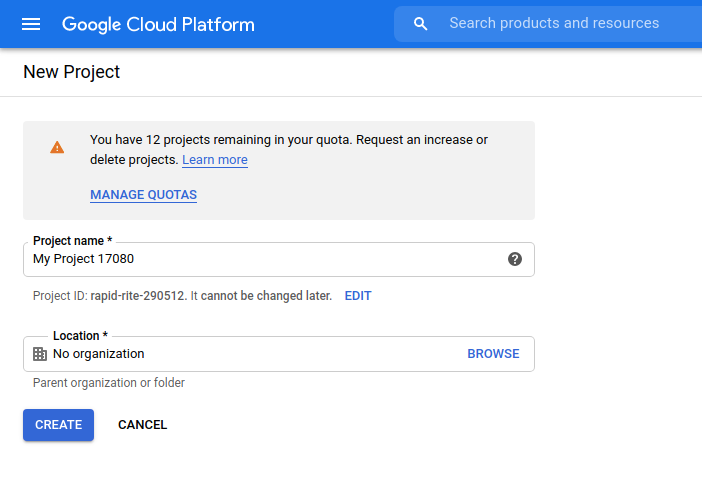
- After that set a project ID & it is non editable and click create

Now, the app has been created successfully.
2. Setup project on Cloud Run
- Select app from top bar of GCP.
- Select Cloud Run from left navigation menu.
- Here click on create service from top navigation bar.
- Now select your nearest region available and give a service name.

- In Authentications, select unauthenticated for the public APP & authenticated for restrictions. Now I'm selecting unauthenticated.
- Click on Next. and it goes to Configure the service's first revision.
- If you have a container image of project then select option one i.e. Deploy one revision from an existing container image.
- I don't have any image. So, selecting second option i.e. Continuously deploy new revisions from a source repository
- It ask for set up with cloud build. Click it.

- Link your git hub accout and select repository. and click next.
- Now select your branch and build type Dockerfile.

- Click save.
- Now click advance settings for cloud run.

- General section will auto filled by GCP. Jump to the capacity.

- Select the container configurations. It woks on auto scaling so, when a container will occupied full the it automatically creates a new container with same configurations and it will go on up to max number of instances.
- You can also manage the Max number of instances.
- Two more options are there. variables and connection.
- In variables you can add build variables.
- In connections you can add DB connection.
- I don't required these both options.
- click create
The first application has setup successfully on GCP.

Comments
Post a Comment